
OpenCode CLI ਬਨਾਮ Desktop: 2026 ਵਰਕਫਲੋ ਤੁਲਨਾ
Table of Contents
OpenCode CLI ਅਤੇ desktop ਇੱਕੋ coding-agent product ਦੇ clients ਹਨ। Terminal interface keyboard-driven ਕੰਮ ਅਤੇ scripts ਲਈ ਢੁਕਵਾਂ ਹੈ। Desktop application graphical workspace ਦਿੰਦੀ ਹੈ। ਮਹੱਤਵਪੂਰਨ ਤੁਲਨਾ ਵਿੱਚ ਹਰ client ਦੇ ਪਿੱਛੇ server, project, provider ਅਤੇ configuration ਸ਼ਾਮਲ ਹਨ।
Backend ਪਛਾਣਨ ਤੋਂ ਬਾਅਦ interface ਚੁਣੋ। ਦੋ OpenCode windows ਇੱਕੋ server ਜਾਂ session ਵਰਤਣ, ਇਹ ਜ਼ਰੂਰੀ ਨਹੀਂ। ਵੱਖਰੇ server ਨਾਲ ਜੁੜੀ desktop application ਵੱਖਰਾ execution environment ਹੈ, ਭਾਵੇਂ model label ਜਾਣ-ਪਛਾਣ ਵਾਲਾ ਲੱਗੇ।
ਮੁੱਖ ਗੱਲਾਂ
- Terminal ਕੰਮ ਅਤੇ non-interactive commands ਲਈ CLI ਵਰਤੋ।
- Graphical workspace ਲਈ desktop ਵਰਤੋ, ਅਤੇ ਚੁਣੇ server ਦੀ ਜਾਂਚ ਕਰੋ।
- Provider configuration inference ਤੈਅ ਕਰਦੀ ਹੈ, interface ਤੋਂ ਸੁਤੰਤਰ।
- ਇੱਕੋ product identity ਵੱਖਰੇ servers ਜਾਂ versions ਵਿਚਕਾਰ ਇੱਕੋ session state ਦੀ ਗਾਰੰਟੀ ਨਹੀਂ ਦਿੰਦੀ।
ਦਾਇਰਾ ਅਤੇ ਮਿਤੀ: Official documentation 6 October 2026 ਨੂੰ ਜਾਂਚੀ ਗਈ। ਇਹ guide interfaces ਦੀ ਤੁਲਨਾ ਕਰਦੀ ਹੈ, model quality ਦੀ ਨਹੀਂ। ਤੁਹਾਨੂੰ repository, working provider connection ਅਤੇ basic terminal familiarity ਚਾਹੀਦੀ ਹੈ। Trial ਲਈ 45 ਤੋਂ 60 ਮਿੰਟ ਰੱਖੋ।
Client ਅਤੇ Server
OpenCode interface ਨੂੰ server ਤੋਂ ਵੱਖ ਕਰਦਾ ਹੈ।
Server documentation
terminal UI ਨੂੰ client ਅਤੇ opencode serve ਨੂੰ standalone server ਦੱਸਦੀ ਹੈ। ਇਹ architecture agent ਨਾਲ ਕੰਮ ਕਰਨ ਦੇ ਕਈ ਤਰੀਕੇ ਦਿੰਦੀ ਹੈ।
Desktop default ਰੂਪ ਵਿੱਚ local server ਸ਼ੁਰੂ ਕਰਦਾ ਹੈ।
Troubleshooting guide
ਇਸ ਦੇ opencode-cli sidecar ਅਤੇ configured server URL ਨਾਲ connect ਕਰਨ ਦਾ option ਦੱਸਦੀ ਹੈ। Clients ਦਾ ਵਿਵਹਾਰ ਵੱਖਰਾ ਹੋਵੇ ਤਾਂ prompt ਬਦਲਣ ਤੋਂ ਪਹਿਲਾਂ connection ਜਾਂਚੋ।
| Layer | ਜਵਾਬ ਦੇਣ ਵਾਲਾ ਸਵਾਲ |
|---|---|
| Client | Terminal UI, desktop app ਜਾਂ non-interactive command? |
| Agent server | ਕਿਹੜਾ process request ਲੈਂਦਾ ਹੈ? |
| Repository | Server ਕਿਹੜੀ directory access ਕਰਦਾ ਹੈ? |
| Model provider | ਕਿਹੜੀ service inference ਦਿੰਦੀ ਹੈ? |
| Session | Existing conversation ਜਾਂ ਨਵਾਂ task? |
Server location inference location ਨਹੀਂ ਹੈ। Computer ਉੱਤੇ agent server ਹੋਣ ਦੇ ਬਾਵਜੂਦ requests configured hosted model ਨੂੰ ਜਾ ਸਕਦੀਆਂ ਹਨ। ਇਸ ਦੇ ਉਲਟ compatible local inference service ਆਪਣੇ model ਅਤੇ resource requirements ਵਾਲਾ ਵੱਖਰਾ process ਹੈ।
Official server reference opencode serve ਲਈ default hostname ਵਜੋਂ 127.0.0.1 ਦਿੰਦੀ ਹੈ। Local trial ਦੌਰਾਨ service ਨੂੰ loopback ਉੱਤੇ ਰੱਖੋ:
opencode serve --hostname 127.0.0.1
Wider bind address ਸਿਰਫ authentication, firewall rules ਅਤੇ server ਨੂੰ ਦਿਖਦੇ repository paths ਤੈਅ ਕਰਨ ਤੋਂ ਬਾਅਦ ਵਰਤੋ।
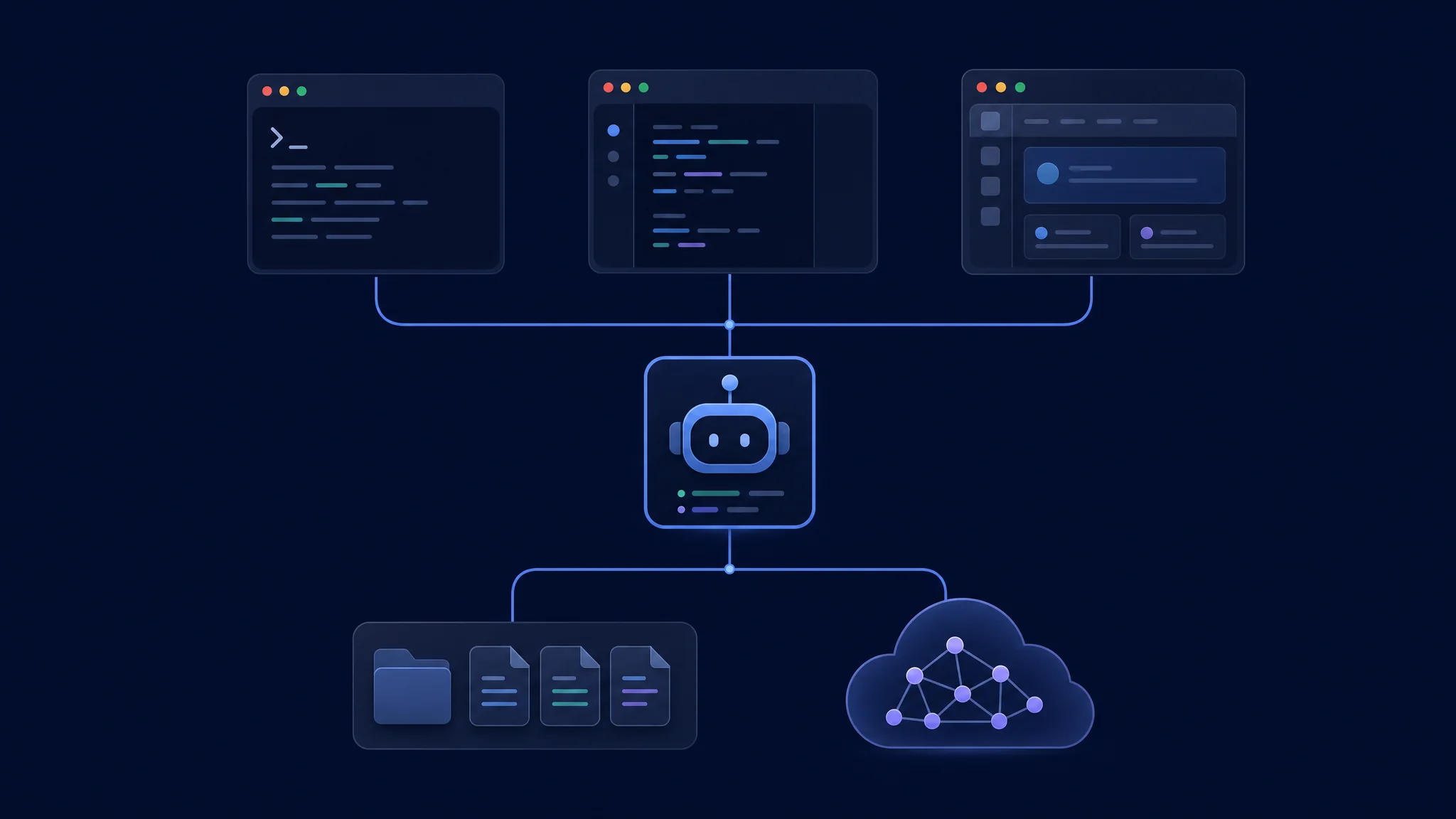
Agent server ਅਤੇ inference provider ਨੂੰ ਵੱਖ-ਵੱਖ ਜਾਂਚੋ
Terminal Interaction ਅਤੇ Automation
opencode
Default command terminal UI ਖੋਲ੍ਹਦਾ ਹੈ। CLI reference programmatic commands ਵੀ ਦੱਸਦੀ ਹੈ। Intended repository ਵਿੱਚ ਸ਼ੁਰੂ ਕਰੋ ਅਤੇ edits ਮੰਗਣ ਤੋਂ ਪਹਿਲਾਂ selected agent ਅਤੇ model ਦੀ ਪੁਸ਼ਟੀ ਕਰੋ।
opencode run "Identify this project's test command. Do not modify files."
Bounded non-interactive request ਲਈ opencode run ਵਰਤੋ। Appropriate permission policy ਵੱਖਰੇ ਤੌਰ ਤੇ ਸੈੱਟ ਕਰੋ। No-change prompt ਦਿਸ਼ਾ ਦਿੰਦਾ ਹੈ, ਪਰ filesystem isolation enforce ਨਹੀਂ ਕਰਦਾ।
Shell composition ਮਹੱਤਵਪੂਰਨ ਹੋਵੇ ਤਾਂ ਇਹ workflow ਚੁਣੋ। Repeatable wrapper ਨੂੰ request, exit status, relevant output ਅਤੇ changed files capture ਕਰਨੇ ਚਾਹੀਦੇ ਹਨ। Failure handling ਸਪਸ਼ਟ ਰੱਖੋ। Empty diff ਅਤੇ success message ਦੀ ਵਿਆਖਿਆ verified fix ਤੋਂ ਵੱਖ ਹੈ।
Desktop Setup ਅਤੇ Compatibility
Intended release ਲਈ official download page ਵਰਤੋ। OpenCode download page terminal ਅਤੇ desktop packages ਦਿਖਾਉਂਦੀ ਹੈ। ਇਸ ਜਾਂਚ ਵਿੱਚ page v2 terminal packages ਦਿਖਾਉਂਦੀ ਹੈ, ਜਦਕਿ general documentation ਵਿੱਚ ਪੁਰਾਣੇ installation examples ਵੀ ਹਨ। Exact client ਅਤੇ backend versions ਲਿਖੋ ਅਤੇ ਵੱਖਰੇ release tracks ਦੀਆਂ instructions ਨਾ ਮਿਲਾਓ।
ਛੋਟੇ real task ਨਾਲ desktop interaction ਦੀ ਜਾਂਚ ਕਰੋ। Project ਖੋਲ੍ਹੋ, server confirm ਕਰੋ, bounded request ਭੇਜੋ, changed files inspect ਕਰੋ ਅਤੇ correction ਮੰਗੋ। Agent ਦੀਆਂ actions ਸਮਝਣ ਲਈ ਲੱਗਦਾ effort ਮਾਪੋ। Graphical client ਨੂੰ editor ਅਤੇ debugger ਦਾ complete replacement ਨਾ ਸਮਝੋ।
| Desktop trial | ਉਮੀਦ ਕੀਤੀ evidence |
|---|---|
| Project selection | Agent intended repository ਪਛਾਣਦਾ ਹੈ |
| Model selection | Provider ਅਤੇ model trial record ਨਾਲ ਮਿਲਦੇ ਹਨ |
| Command execution | Required runtime ਅਤੇ tests ਉਪਲਬਧ ਹਨ |
| Change inspection | Full patch ਲੱਭਣਾ ਅਤੇ review ਕਰਨਾ ਸੌਖਾ ਹੈ |
| Restart | Intended project ਅਤੇ session ਪਛਾਣਯੋਗ ਰਹਿੰਦੇ ਹਨ |
Configuration ਅਤੇ Model Access
OpenCode ਕਈ locations ਤੋਂ configuration merge ਕਰਦਾ ਹੈ। Configuration reference precedence ਅਤੇ non-conflicting settings ਦੇ preservation ਬਾਰੇ ਦੱਸਦੀ ਹੈ। ਸਿਰਫ project file ਨਹੀਂ, effective model, agent ਅਤੇ permissions ਦੀ ਤੁਲਨਾ ਕਰੋ।
Provider access execution setup ਦਾ ਹਿੱਸਾ ਹੈ। Provider guide supported services ਅਤੇ compatible endpoints ਦੱਸਦੀ ਹੈ। Credentials, endpoint reachability ਅਤੇ model tool support ਮਹੱਤਵਪੂਰਨ ਹਨ। ਹੋਰ ਥਾਂ ਚੱਲ ਰਹੇ server ਨੂੰ provider ਅਤੇ repository ਲਈ ਆਪਣਾ valid access ਚਾਹੀਦਾ ਹੈ।
Client total inference cost ਤੈਅ ਨਹੀਂ ਕਰਦਾ। Matching models ਅਤੇ tasks ਉੱਤੇ billed usage ਦੀ ਤੁਲਨਾ ਕਰੋ। Configuration errors ਨਾਲ ਹੋਈਆਂ repeated runs ਵੀ ਗਿਣੋ। Local inference ਲਈ system memory, model format, context size ਅਤੇ runtime settings record ਕਰੋ। Desktop download ਨੂੰ hosted computation ਦਾ free replacement ਨਾ ਦੱਸੋ।
Sessions ਅਤੇ Safe Switching
Continuity ਮੰਨਣ ਦੀ ਥਾਂ verify ਕਰੋ। Clients ਬਦਲਣ ਤੋਂ ਪਹਿਲਾਂ active project ਅਤੇ session record ਕਰੋ। ਜਾਂਚੋ ਕਿ destination intended server ਨਾਲ connect ਹੈ ਅਤੇ intended history ਦਿਖਾਉਂਦਾ ਹੈ। New session ਲਈ goal, completed work ਅਤੇ remaining checks ਵਾਲਾ concise handover ਦਿਓ।
ਇੱਕ checkout ਉੱਤੇ concurrent edits ਤੋਂ ਬਚੋ। ਵੱਖਰੇ plans ਵਾਲੀਆਂ ਦੋ conversations ਇੱਕ directory target ਕਰਨ ਤਾਂ files share ਕਰਦੀਆਂ ਹਨ। Independent experiments ਲਈ separate worktrees ਜਾਂ checkouts ਵਰਤੋ। Changes integrate ਕਰਨ ਤੋਂ ਪਹਿਲਾਂ review ਕਰੋ।
Handover record
Goal:
Current branch and working directory:
Files changed:
Checks already completed:
Known failures:
Next approved action:
ਇਹ record handover ਨੂੰ inspectable ਬਣਾਉਂਦਾ ਹੈ। ਇਹ interface issue ਨੂੰ missing instruction ਜਾਂ environment mismatch ਤੋਂ ਵੱਖ ਕਰਨ ਵਿੱਚ ਵੀ ਮਦਦ ਕਰਦਾ ਹੈ। Credentials record ਵਿੱਚ ਨਾ ਰੱਖੋ।
Server Access ਅਤੇ Permissions
Agent server ਨੂੰ execution service ਸਮਝੋ। Server documentation OPENCODE_SERVER_PASSWORD ਰਾਹੀਂ optional authentication ਦੱਸਦੀ ਹੈ। Machines connect ਕਰਨ ਤੋਂ ਪਹਿਲਾਂ access ਨੂੰ ਜਾਣਬੁੱਝ ਕੇ configure ਕਰੋ। Reachable agent server harmless static website ਨਹੀਂ ਹੈ।
Tool permissions ਦੀ ਵੱਖਰੀ ਸਮੀਖਿਆ ਕਰੋ। Permission guide allow, ask ਅਤੇ deny behavior ਪਰਿਭਾਸ਼ਿਤ ਕਰਦੀ ਹੈ। Interface trial ਵਿੱਚ ਉਹੀ policy ਲਾਗੂ ਕਰੋ। Effective rules ਜਾਂਚੇ ਬਿਨਾਂ ਘੱਟ prompts ਵਾਲੇ client ਨੂੰ safer ਜਾਂ more capable ਨਾ ਮੰਨੋ।
Harmless policy test ਨਾਲ ਸ਼ੁਰੂ ਕਰੋ। Disposable project ਵਿੱਚ allowed file inspection ਅਤੇ prohibited edit ਮੰਗੋ। Observed behavior verify ਕਰਕੇ bounded implementation ਵੱਲ ਜਾਓ। ਇਸ ਨਾਲ permission assumption testable ਬਣਦੀ ਹੈ।
Troubleshooting ਅਤੇ Choice
| Symptom | ਪਹਿਲੀ inspection |
|---|---|
| Desktop connection failure | Selected server ਅਤੇ local sidecar status |
| ਇੱਕ client ਵਿੱਚ model ਨਹੀਂ | Server version, provider access ਅਤੇ configuration |
| ਵੱਖਰਾ test result | Project directory ਅਤੇ runtime environment |
| Conversation missing | Server ਅਤੇ session identity |
| Plugin load ਹੋਣ ਤੱਕ ਕੰਮ ਕਰਦਾ ਹੈ | Plugin configuration ਅਤੇ release compatibility |
Terminal ਚੁਣੋ ਜੇ scripted requests ਅਤੇ shell context ਕੰਮ ਸੌਖਾ ਕਰਦੇ ਹਨ। Desktop ਚੁਣੋ ਜੇ graphical project navigation supervision ਸੁਧਾਰਦੀ ਹੈ। Provider ਅਤੇ policy decisions ਨੂੰ ਇਸ preference ਤੋਂ ਵੱਖ ਰੱਖੋ।
ਅਗਲੇ ਕਦਮ: CLI roundup ਵਿੱਚ terminal alternatives ਦੀ ਤੁਲਨਾ ਕਰੋ। Local inference requirements ਲਈ OpenCode and Strata guide ਪੜ੍ਹੋ। Graphical alternatives ਲਈ GUI roundup ਵਰਤੋ।
Related Posts